You don’t need to be tech savvy to support your child’s interest in coding.


3 Months for $17/mo (save 32%)
For Every Black Friday signup, Griffpatch funds a GIF global access spot so kids worldwide can learn to code!

✨ Complete game build PDF
One-off purchase. No subscription.
You've watched Griffpatch build.
Now it's your turn.
Get the official Lemonoids build workbook
– and build the game with confidence.
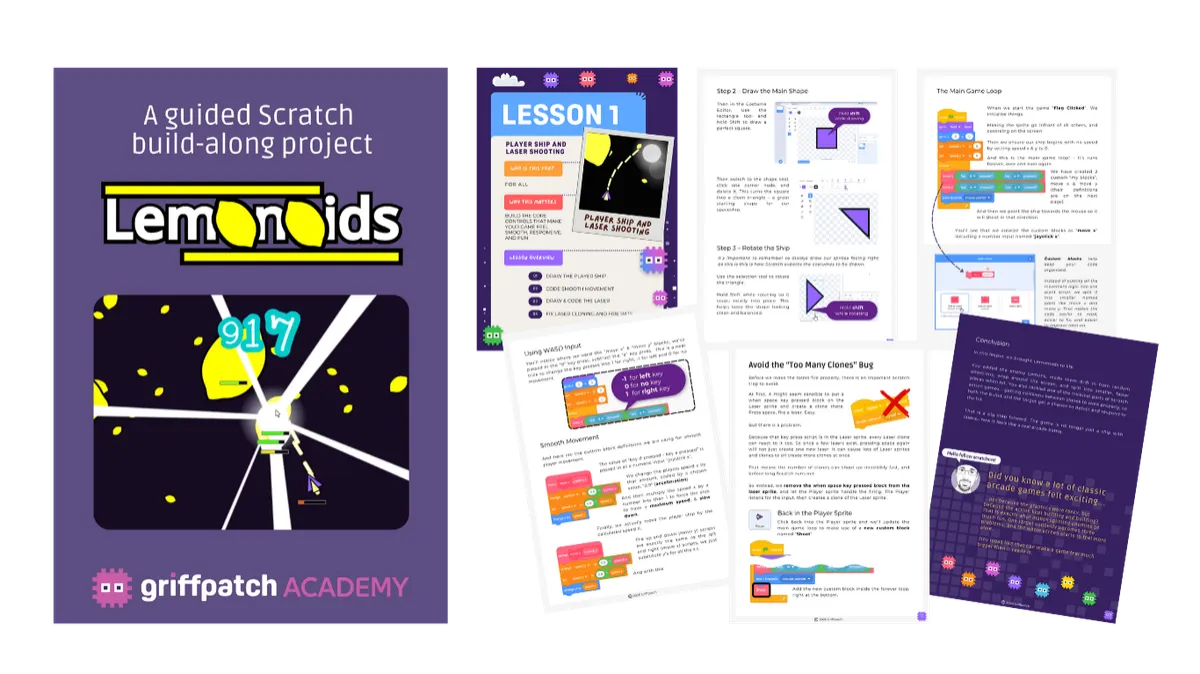
The Lemonoids Space Shooter Workbook is the perfect companion to the YouTube tutorial series – helping young Scratchers follow each lesson, understand the scripts, and keep building even when the video is paused.
Inside, you’ll find a clear step-by-step guide, helpful notes, coding checkpoints, and space to make the project your own.
Not just “I watched Griffpatch build that.”
But “I built it myself.”
There's a moment every Griffpatch fan knows...
You're watching a tutorial. The game is coming together on screen. You're thinking: "I want to make that."
Maybe you started. Maybe you got a few steps in before something broke and you weren't sure why. Maybe you followed all the way through — but then couldn't remember how any of it worked.
That feeling — the gap between watching and actually building — is exactly what this workbook closes.
Because this isn't a YouTube video you have to keep watching as you build. This is a digital build guide you keep — laid out step by step, explained in plain language, written by Griffpatch himself and designed to sit beside you while you build so nothing gets missed, nothing stays confusing, and nothing stops you finishing.
The build guide for Griffpatch's Lemonoids Space Shooter — yours for $9.
Lemonoids is a fully-featured space shooter game built in Scratch — one of Griffpatch's most accessible and exciting projects.
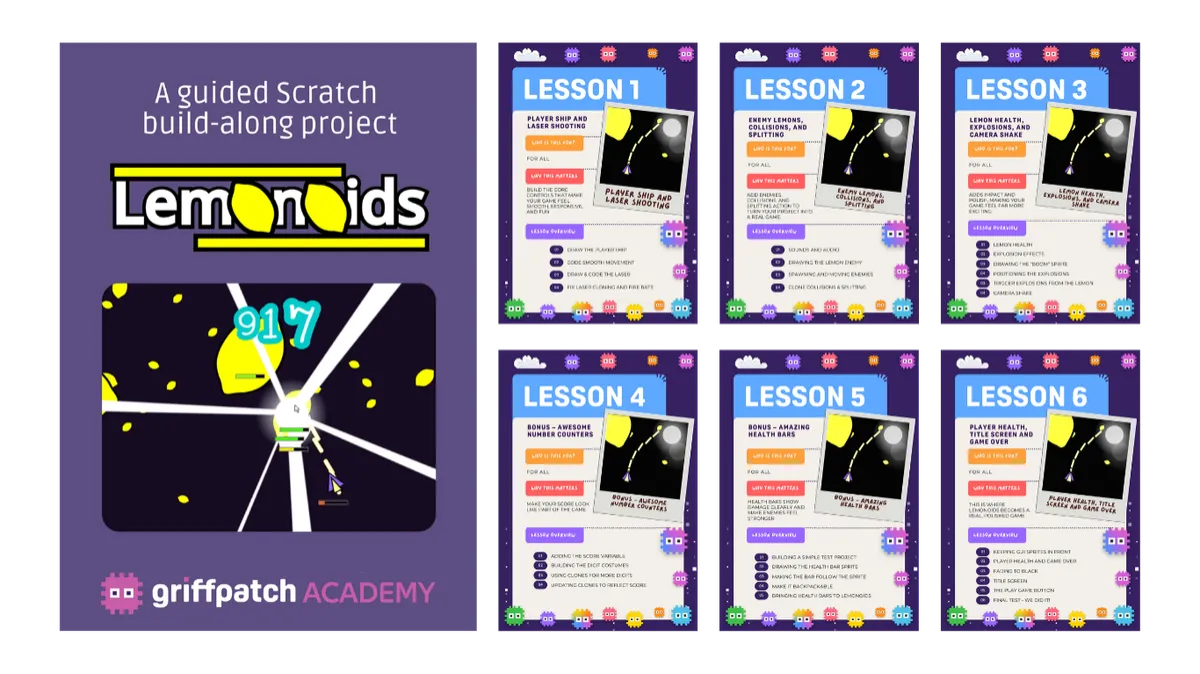
This workbook is your personal build companion for the whole project.
Think of it like a LEGO manual for game building — every stage laid out clearly, every mechanic explained so you understand what you're doing, not just copying what you see.
You work through it at your own pace. You keep it forever. And when you finish?
You have a complete, working game you built yourself.
What's Inside
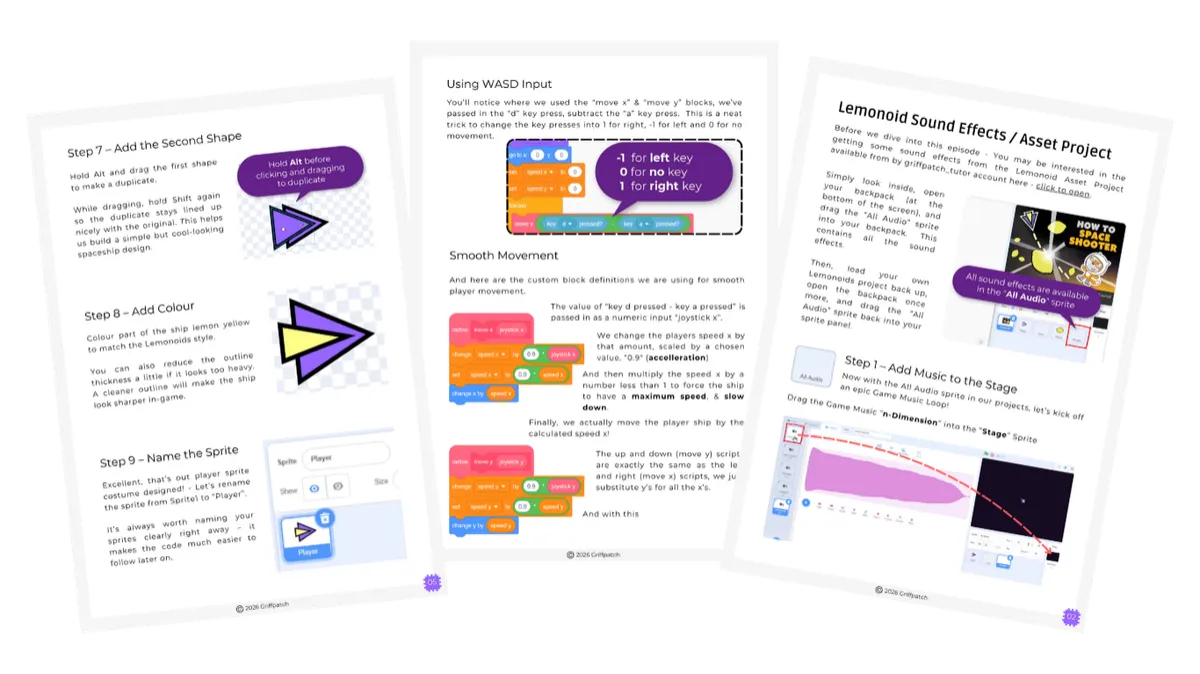
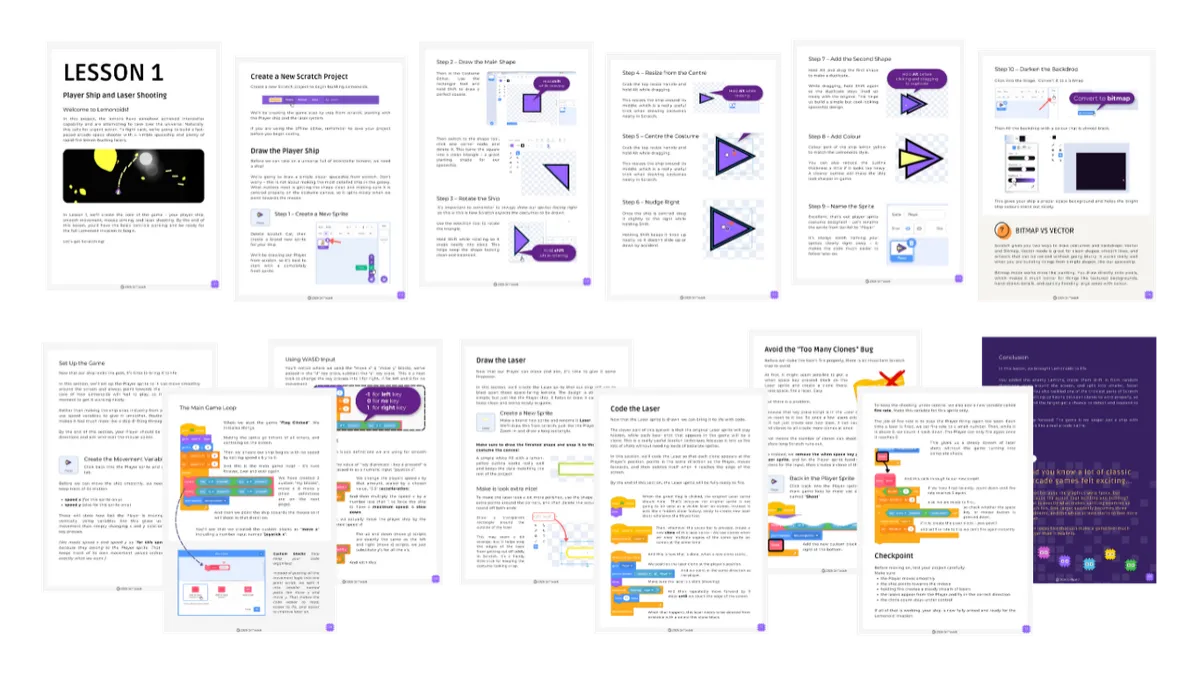
📖 A complete, step-by-step build guide
Every stage of the Lemonoids project laid out in order — so you always know exactly what to do next. No confusion. No guessing. No getting lost halfway through.
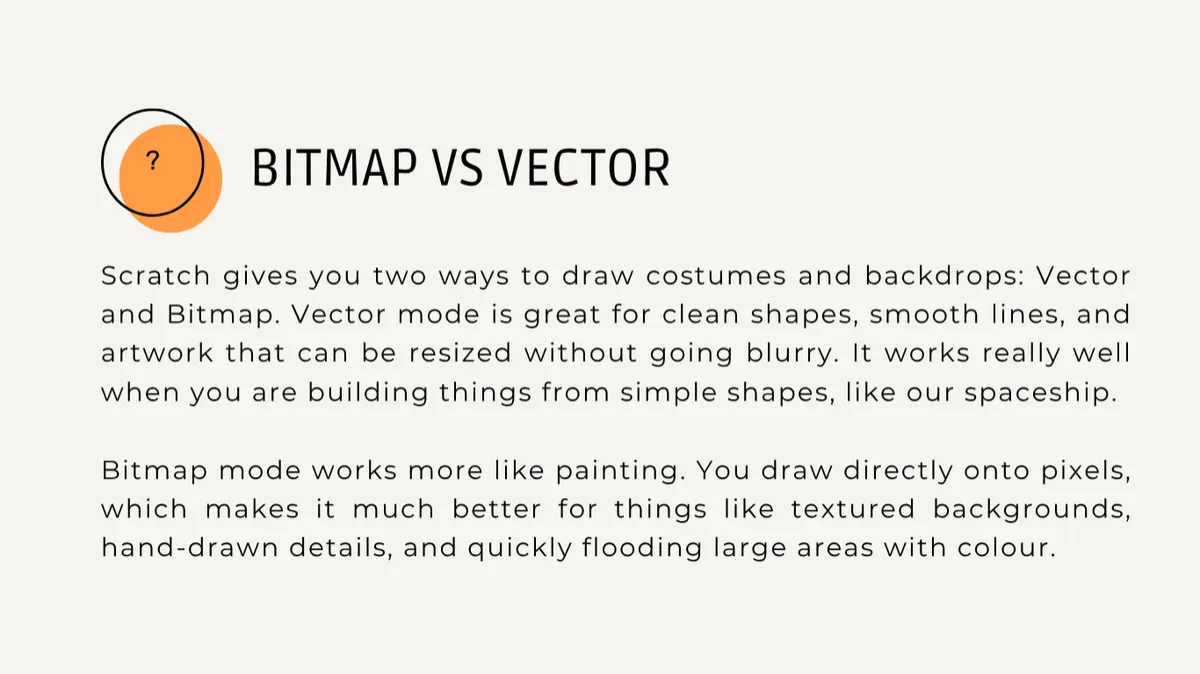
🔍 Plain-language explanations for every mechanic
Each step tells you what to do AND why it works. So you're not just copying — you're actually understanding. That understanding is what lets you fix things when they break, and change things when you want to make it your own.
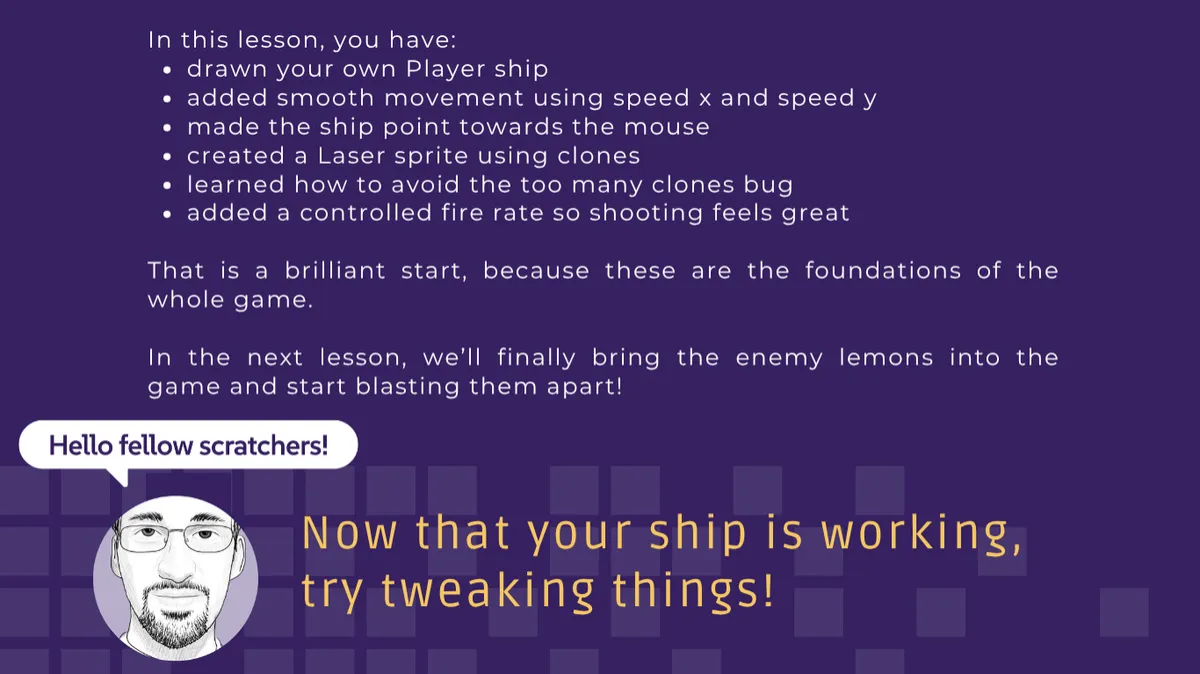
✅ Build checkpoints throughout
Tick-off sections as you go so you always know where you are, how far you've come, and what's coming next. Finishing feels like finishing — because you can see your progress the whole way through.
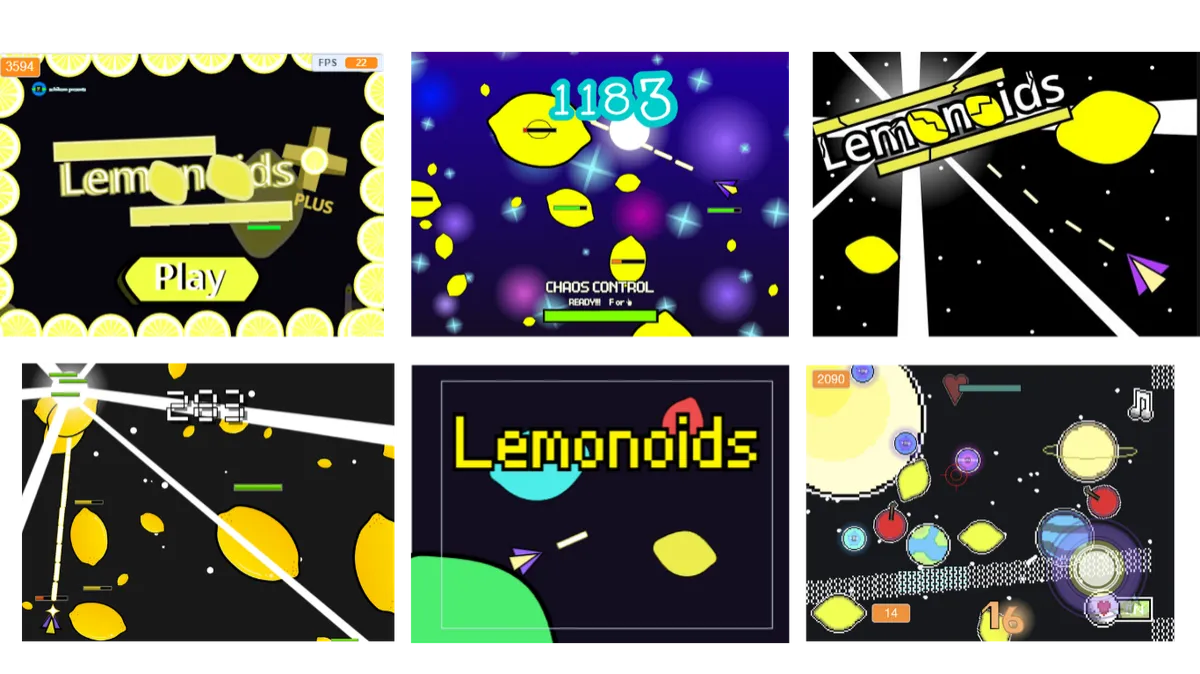
🎮 A real, complete game at the end
Not a half-finished project. Not a tutorial exercise. A complete, playable space shooter — built by you, on your account, on your profile. Yours.
➕ Bonus: The Level Up Challenge
⚡For builders who want to go further
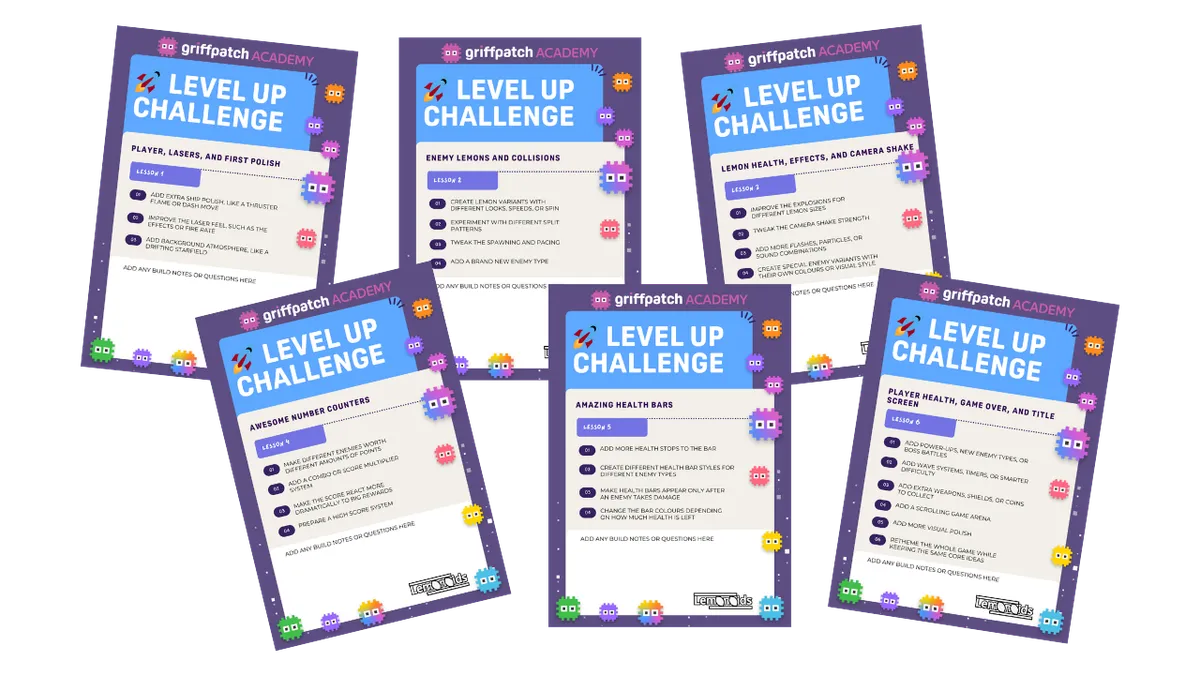
Included with every lesson is a Level Up Challenge — an optional creative extension that invites you to take what you've just built and push it further.
These aren't instructions. There's no "right answer." They're prompts designed to make you think like a game designer — not just a builder following steps.
Things like:
🔥 Add a thruster flame to your ship — make it feel alive
🪙 Add extra weapons, shields, or coins to collect
👽 Create special enemy variants with their own colours or visual style
Some of you will skip them and still finish a great game. That's completely fine.
But for the builders who want to go beyond the tutorial — who want their version to look different, feel different, and be genuinely theirs — the Level Up Challenges are where that happens.
This is the difference between building a game and building your game.
Not an advanced coder yet? No problem.
The core workbook gets you to a complete, working Lemonoids game. The Level Up Challenges are there when you're ready — whether that's this build or the next one.
🎮 The Lemonoids tutorial series is on YouTube. Griffpatch built it. You've probably already seen some of it.
But a YouTube video and a build workbook do very different things.
YouTube is great for watching.
The workbook is built for doing.
When you're mid-build and something breaks, you can pause a video and scan back through it quickly but that can be tricky. When you want to check what a particular mechanic does, you can't ctrl+F a YouTube video. When you want to revisit a step three days later without watching 40 minutes again — you can't.
The workbook is designed to live beside you while you build — to be the reference you return to, mark up, write notes in, and own.
It's not a replacement for the videos. It's what turns watching into finishing.
And finishing is the whole point.
For Parents
A note for parents
Your child has probably watched Griffpatch on YouTube for longer than you realise.
They know the games. They love the style. And at some point — most of them have thought about trying to build one themselves.
For $9, this workbook gives them a structured, clear, step-by-step path to actually do it.
No previous coding experience needed.
The workbook starts from the beginning and explains everything as you go.
No technical knowledge needed from you.
And for children who want more than just following steps — each lesson includes a Level Up Challenge: an optional creative extension that encourages them to add their own ideas to the game. A different weapon effect. A movement mechanic they invented. A visual detail that makes their version stand out from everyone else's.
This is where the workbook stops being a tutorial and starts being a creative tool. And it's where the shift from "I followed the instructions" to "I actually made this" really happens.
The guide is written clearly enough for your child to follow independently — you don't need to understand a line of code to support them with this.
No subscription, no ongoing commitment.
This is a one-time $9 purchase. They download it, they build at their own pace, they keep it forever.
The only thing it requires is a free Scratch account — which takes about two minutes to set up.
$9 for a complete build project your child owns, understands, and finishes. That's a good deal.

This Is For You If You've
You've watched Griffpatch on YouTube and want to actually build something yourself
You've tried to follow tutorials before but got lost, stuck, or didn't finish
You want a game you understand — not just one you copied
You want something you can come back to, reference, and use at your own pace
You're a parent who wants your child to build something real — without a big financial commitment
❌ This isn't for you if you're happy just watching and don't want to build.
This is the build you've been watching.
You already know what Lemonoids looks like. You've already seen what Griffpatch built. Now it's time to build your own version.
Not watch it. Not almost-finish it. Not start and give up when something breaks.
Build it. Finish it. Keep it.
For $9 — that's the deal.
Created by Griffpatch
Trusted by thousands of young coders around the world.


Griffpatch is one of the most recognised Scratch educators on YouTube, with a global audience of young creators learning how to build real games.
Inside Griffpatch Academy, children regularly complete full projects, take part in game jams, and share what they’ve built.
We created this workbook because we saw a pattern.
Children were inspired by tutorials — but often lacked the structure to finish independently.
This workbook bridges that gap.
It’s suitable for boys and girls, beginners and more experienced Scratch users, and works especially well for children who thrive with clear, structured steps.
Is This Right for My Child?
Is this suitable for beginners?
Yes. If your child has basic familiarity with Scratch (moving sprites, adding blocks), they can follow this build. The workbook breaks the game into clear, manageable steps.
Does this include video tutorials?
No. This is a structured build workbook designed for independent creators. If your child prefers step-by-step video walkthroughs and live community support, those are available inside Griffpatch Academy.
What if they get stuck?
Working through challenges is part of building. The workbook provides a clear build sequence so they always know what to focus on next. If they later decide they’d like guided support, they can join the Academy at any time.
Do I need coding knowledge to help?
No. The workbook is written for children to follow independently.
How do we receive it?
You’ll receive instant digital access after purchase.
Is this included in the Academy?
Yes. Academy members receive this workbook as part of their membership.
No coding experience needed
No subscription — one-time $9 purchase
Instant download — start building today
Works alongside the free YouTube tutorials
Step-by-step build guide designed by Griffpatch
Level Up Challenges — for builders who want to make it their own
Yours to keep, reference, and return to forever
As Featured On





Teaching online with more than 160+ videos!
Loved by Kids & Students...

@tronche2cake
(Student)
I'm an adult and I know how to code in other languages, but I still watch your videos, because having to translate the simple blocks into real code gives me a better understanding of how and why it works, than copying stuff off of Github or Stack Overflow. Thanks for all your help Griffpatch

Carli (Student)
Your tutorials are fantastic! Although I've been on scratch for over 4 years, your tutorials still teach me new stuff. Your tutorials are really easy for anyone to understand- making the code very customizable! A key part of tutorials is explaining why you need that piece of code, how it works, and the like. Some people will just sit there telling you what to do- but not why it works. Thank you for being such an influential scratcher. Please keep it up! Plus: I'm looking forward to a new tutorial past this- possibly a roguelike? ;)

Mountain Tiger (Student)
Amazing video as before in this series. I started doing scratch and then moved on to C# and Unity and even in a more advanced language i still am learning things from you. You Rock Griffpatch ⚡ And out of all the videos uploaded by subscribers in my list i always watch your first!

Dawn (Student)
I love these tutorials! I'm a computer science student now, but my original interest in programming came from Scratch. The way you explain how things work in these videos is amazing, it's done in a way that even beginner Scratchers can pick up on, and I still find myself learning new and better ways to organize my code from them. I love seeing how much Scratch can really do...

@user-yg3ub7vx9l (Student)
I had 5 online teachers who taught me game design, yet i found Griffpatch and i learned more stuff from his videos more than all of my old teachers combined i love ur videos! :D

Johanna (Student)
BEST TEACHER EVERRRRR!!!!!!!!!!!!

Jane (Student)
When Griffpatch is way smarter than your computing teacher (fr we did scratch and she knew nothing about scratch)
Jama
(Student)
Thank you Griffpatch for the tutorials :) you have improved the scratch experience for people and you are the only reason I got into programming! Even if you don't read this, I just want to write a thank you note. love from South Africa
Bob (Student)
Your Scratch tutorials are unmatched. I think you've found a perfect balance between keeping the videos a certain length and making sure the viewer understands what they're doing. I usually watch the tutorials before following them so I have a general idea of what I'm going to have to do when I eventually follow them. Keep doing what you're doing, because you're doing an incredible job. :)
@MyCodingDiarie (Student)
I feel smarter after watching your videos. Thank you!
Ethan
(Student)
When was 9 found your account on Scratch, you amazed me with what you could do with it and inspired me to start teaching myself how to code. Now I'm finishing my 2nd semester of CS at university and am loving it still. Just wanted to say thank you for inspiring me as a kid.

Jordan
(Student)
I think everything about your videos is great. They are the right pace with the right amount of explanation. I wouldn't even mind if they were longer! I always learn the most and retain the information using your tutorials! I always ask myself when I am stuck on a coding problem: what would Griffpatch do!
Chieseledboockshelf(Student)
Can you be my math teacher?
Vixioelol (Student)
If Griffpatch were my computer science teacher that would be my favourite class
TappoType
(Student)
Absolute GOLD of a tutorial! You keep blowing me away, Griffpatch!
Ben
(Student)
9 months ago I just found that you made a channel as I wanted to thank you. I followed your work as a kid and it defo was a big part of what sparked my interest in programming. years on and my interest is still going strong. Hopefully going to university for computer science next year. So yeah thanks.

Paul
(Student)
I have only one word to say: INCREDIBLE ! I've never been so excited in my life to do something, you have done such an amazing job!
Prdus
(Student)
You would be the teacher everyone loves at school
Campanariart2721 (Student)
You inspired me to make my dream game, you are the best teacher ever!
@o9mansionboy_creater (Student)
You are just the best Griffpatch you are the one who inspired me to start my coding adventure and iv learned so much and I am glad to say thanks for all you have done I would have not discovered my passion for coding without you so I am very glad to say I love your idea of a academy for more people to get inspired like you did to me I am eternaly grateful for you
And Parents...
1984drum (Parent)
Just want to say thanks for all the amazing tutorials. My son was off school for a a few days with an illness and we worked together to see who could finish as much of the mario platformer as possible. Loads of fun! He said he's learned way more doing your tutorials than he would have at school lol
Eayuwna (Parent)
Thank you for all your efforts. My 9 year old son is now the king of his code club having followed your tutorial and has started asking me to teach him what sin, cos and tan are - wish me luck ;-) Your content is so well put together thank you so much.
Jean-Baptiste (Parent)
The pace is great. Sometimes we follow along with my son and sometimes we just watch you work your magic together. I can’t overstate the positive impact you have on my 7yo son, he loves you and we bond watching your videos.
Daniel (Parent)
I am loving this series as my daughter is having great fun making gardens and house interiors with the editor.
Steve (Parent)
Pace is great! We pause frequently but sometimes keep up. I’d rather that than too slow. My 11-yo and I are coding the rpg series together (each on separate computers) and it has been great quality time. He has done and loved many of your other videos. When I don’t follow the rationale of the script, I hit the back arrow for 10 or 20 second rewind and listen again after I have the code in place. Of course, my son gets it all the first time, sometimes even predicting what you’ll do next
Mike (Grandparent)
As a retired electrical engineer... who has been coding for the last 50 years I have gone through the learning curve of becoming productive in a new programming language multiple times... My grandson and I have been getting together once or twice a week for over a year to develop our Scratch skills. Your video approach has allowed us to learn more about productive Scratch coding in the last 3 months than all we did in the previous year. You have a gift for explaining complex graphics concepts in terms that your followers can understand and adapt as we experiment with your code. You should feel good knowing how much you are contributing to the positive development of a whole generation of Scratchers.
George (Parent)
I am a Software Developer with over 30 years experience, but my son prefers learning from you :) And he really became very good with your videos and scratch. Thank you for your valuable work.
Riteshshivhare156 (Parent)
My son just LOVES this SO MUCH!!!!!!
Calogiga (Parent)
So many many many thanks for sharing your knowledge... Now, as a father, I have a mission to simplify all of this to explain this clearly to my daughter (12 years old) : she's coding and playing with me with Scratch. Many many thanks...
gitavianvs (Parent)
My daughter loves your works. She inspired by you to be a game programmer
Stragejason (Parent)
Hi Grif, I’m not sure if you will see this, but I wanted to let you know, my son of 9 years old, screamed with excitement about your new series, your videos have inspired and helped him learn scratch and it just blows our minds. Anyways, William say hello and thank you.
And Teachers Alike!
JohnW (Teacher)
Hey Griffpatch, thanks for everything you've done for the Scratch education community! You helped me understand how platformers (among other things) work, and now as an educator, I use your projects and tutorials to help get my students excited about coding too! I'm also able to use what I learned studying your programs around 9 years ago to help teach my students. Thank you so much - your work is incredible!
Rousagenciapublicitaria4268 (Teacher)
Thank you for teaching me how to make geometry dash since my students wanted to make one
GeekSHO (Coding Teacher)
This is amazing! Griffpatch, please know how incredible your projects are, but also these video contributions to the community. I teach computer programming, and I often use Scratch for many of my students. These tutorials help me teach students some really cool tricks.
DeanYeats (Teacher)
I appreciate the smaller contained tutorials. I teach groups of students and often see them attempt your longer tutorials and quit a few videos in. Recently I've seen them thrilled to show off the car steering and ball physics ones they've completed. Thank you for all your doing. You are bringing smiles to students and teachers faces worldwide by introducing them to the joys of programming.
Taylor (Teacher)
Great tutorials! I am a teacher using them with my students.
Eden (Coding Teacher)
Hi there, I am a teacher and am using your tutorials with my code club I think the pace of the videos is perfect. The pupils and I follow along pausing when needed and rewinding if necessary. The theory at the beginning along with the additional theory throughout the video is why I use your tutorials, it explains what you are doing in a way that the children understand.
kronicali24 (Teacher)
I had taught basic scratch games to my summer school students, they really loved it. I am surprised how far it has come since.
SPHSPHSPH (Coding Teacher)
As a middle school teacher making scratch vids for my 10-13 year old students, it's a pleasure to have high level stuff being made that helps me as a teacher learn how to do things! I feel like there's only 3-5 other people consistently making high level Scratch content for advanced folks. Love it! :D
Pat (Coding Teacher)
I have a student who wants to add robot arms to her robot sprite that rotates like true shoulder and elbow joints (we are studying the human body) how do I help her with this without a whole lot of variables (she is in grade 5 and I am her coding teacher)
Rob (Teacher)
@griffpatch I'm a teacher and I'm loving all of this! I am hoping to introduce it to some of my middle school computer students.

Spartan (Teacher)
Hi Griffpatch, I urgently need help as I am planning a lesson for my students that is happening very soon... Please help!
© 2026 Griffpatch LTD.
Scratch® is a trademark of the Scratch Foundation. Griffpatch LTD is not affiliated with or endorsed by Scratch.
Griffpatch LTD | Company Number 13965954 | C/O Atrium, York Eco Business Centre, United Kingdom, YO30 4AG | Registered in the UK